

Access: All staff can search for patients.
Search Bar
The search bar is located in the top-right corner of every page in StrataEMR. It searches across all patient accounts — active and inactive. How search works:- Search uses Last Name First Name order, or a partial match against either name
- Typing only part of a name works — for example, searching
Chriswill return Christina, Christopher, etc. - If only one patient matches your search, StrataEMR automatically opens that account to save you a click
- Search is not case-sensitive
Patient Lists
Hovering over the person icon in the Patient Menu provides three list views: Active Patients — Displays all patients currently set to Active status. This is the most common view for day-to-day use. All Patients — Displays every patient account regardless of status, including discharged and inactive. Use this when you can’t find someone in the Active list. Recent Patients — Shows the 5 most recently viewed patient accounts. Useful for quickly returning to a patient you were just working on. Clicking any patient name in these lists opens their Demographics page.Searching from the Schedule
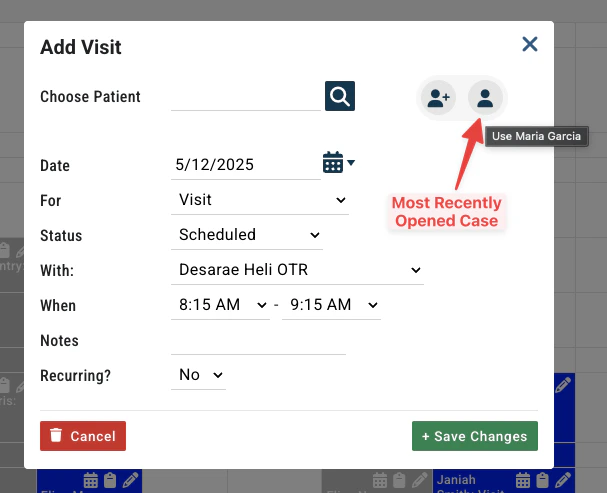
When adding an appointment from the schedule, the patient search in the scheduling window only returns active patients by default. If you need to schedule a patient who is inactive, use the/active or /inactive flags described below, or reactivate the patient first.
After opening a patient case and navigating to the schedule, the last case you had open is available for quick selection via the icon to the right of the search field.
Searching by Payer
Payer names can also be entered in the patient search bar. Searching the name delivers all patients with a policy through that payer. Clarifying your search with the syntax options noted below allow more specific results.Advanced Search Flags
StrataEMR supports a set of search flags that can be appended to any search term for more targeted results. These are especially useful when a basic search returns too many results or when searching by insurance./active is the default when searching from the schedule. The flags are most useful when you need to override that default or search by insurance from the dashboard search bar.