Any insurance paperwork your practice receives — Explanations of Benefits (EOBs), claim denials, refund requests, appeals, and other insurance correspondence — needs to be forwarded to the StrataPT billing team. Sending these documents promptly keeps AR follow-up on track and ensures payments are posted without delay.
Access: All staff can access the Upload page and submit documents to StrataPT.
Upload Page
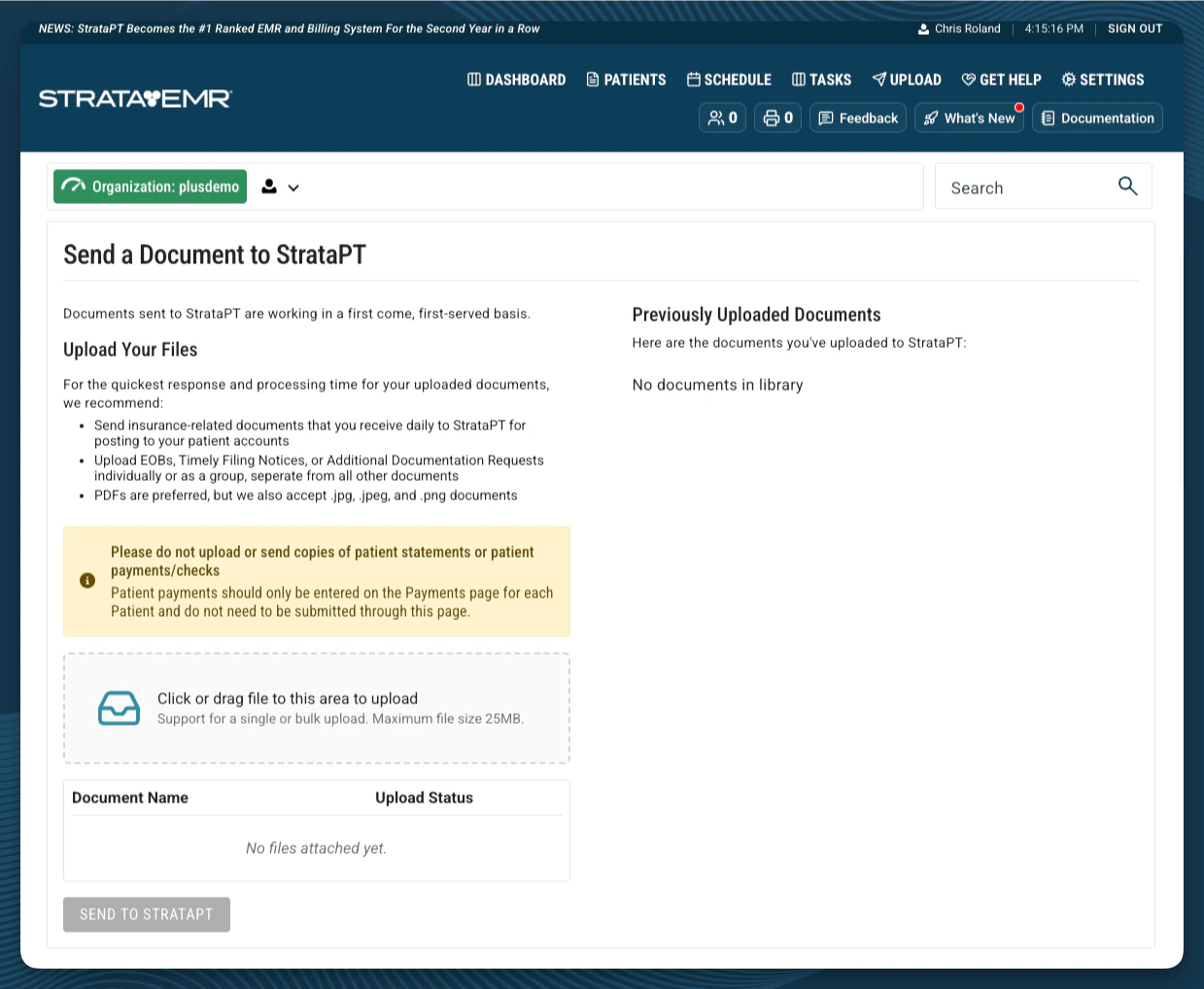
The primary method for sending documents to StrataPT is the Upload page.
Navigate to Upload: Menu Bar > Upload
The page uses a two-column layout:
- Left column — Instructions for what to upload, plus a multi-file upload area. You can drag files into the drop zone or click to browse. Multiple files can be uploaded at the same time.
- Right column — A table showing all documents you’ve previously submitted, including who uploaded each file and when.
Documents submitted through the Upload page are received as work orders by the StrataPT billing team, processed, and automatically classified into the appropriate team queues (payment posting, denials, AR follow-up, etc.).
Fax
As an alternative to uploading, documents can be faxed directly to StrataPT at 941-375-0460. A cover sheet is not required.
What to Send
Send all paperwork received from insurance companies, including:
- EOBs (Explanations of Benefits) — Send daily as received. Prompt submission allows StrataPT to post payments and follow up on denials efficiently.
- Claim denials — Any denial notices received by mail or fax
- Refund requests — Insurance requests for money back on previously paid claims
- Correspondence and notifications — Any other insurance communication that requires billing team action
Do not send insurance paperwork through the Messaging platform. Messaging is for account manager and support communication — it is not monitored for billing documents. Always use the Upload page or fax for insurance paperwork.
What Happens If EOBs Are Not Sent
StrataPT requests that EOBs are submitted daily. If no EOBs are received for 10 days, StrataPT will temporarily hold AR follow-up and patient invoicing for your account. A message will appear on your dashboard advising of the hold. Services resume once EOBs are submitted.
Insurance Refund Requests
When an insurance company sends a refund request, forward the paperwork to StrataPT using the Upload page or fax. StrataPT will review the request for accuracy and determine the appropriate response.
If a refund is owed, StrataPT will send your office a message with instructions. Once your office issues the refund, enter the check number in the message thread to confirm it has been sent. StrataPT’s payment posting team will then apply the refund to the account.
Do not issue refunds outside the StrataPT workflow. Refunds issued without completing the refund task or message thread cannot be tracked properly and will not be reflected accurately in StrataEMR or your invoice.