

Access: All staff can view and manage the Intake Manager pipeline.
How Intake Manager Works
Intake Manager replaces whiteboards and sticky notes with a structured list. Each case sits at a sub-status that shows what step is next. Your front desk can see where every new patient stands without opening individual charts. StrataEMR sets the status of every new case to Intake by default. A new case stays in Intake Manager until you change its status to Active. This keeps new patients visible while you verify demographics, check insurance, and obtain authorization.Note: You may still see Referral as a status name in your account. Patients who were in Referral status before the rebrand still appear in Intake Manager, and StrataEMR treats Referral and Intake the same way. Contact StrataPT Support if you’d like your account’s status name updated to Intake.
Find Intake Manager
Hover over the person icon in the Patient Menu Bar and select Intake Manager. The view lists every case in Intake status at your selected facility.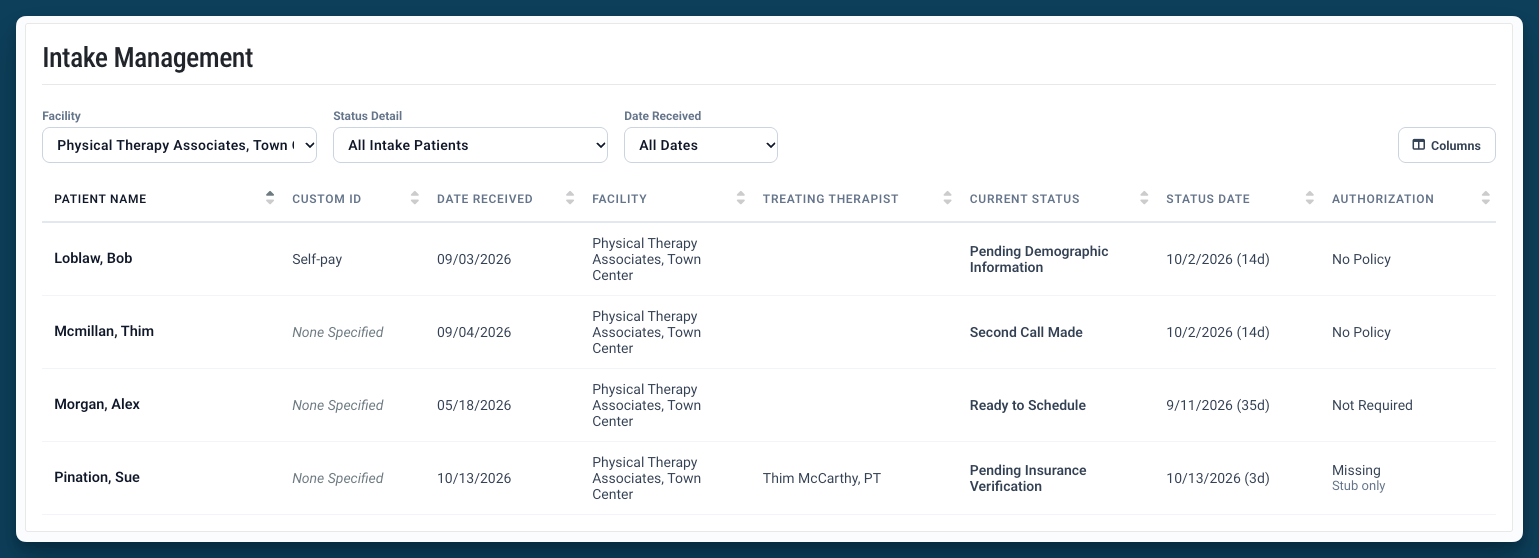
The Intake Pipeline
Cases move through sub-statuses as they progress toward scheduling. Examples of sub-statuses:
Update the sub-status as the patient moves forward.
Intake Columns
The list shows the information your team needs to decide what to do next. Authorization on fileShows whether the case has a valid authorization on file. Use it alongside the sub-status to see whether a patient is ready to schedule.
Update a Case from the Intake Modal
Select a case in the list to open the intake modal. From the modal you can:- Update the patient status and sub-status
- Add a note
- Create a task
- Send a notification to the patient
Intake Banner on a Case
When you open a case with an Intake status, a banner appears with the other case alerts at the top of the page. The banner reads Intake in progress. Open this case in the Intake Manager to track and complete intake steps for this case. Select Open in Intake Manager to go straight to that case’s intake modal.