

When to Use an Amendment
Use the amendment process any time you need to correct the content of a document that has already been submitted to insurance. Common reasons include:- Wrong CPT code or number of units
- Clinical content that needs to be updated after billing
How to Amend a Completed Document
- From the patient’s account, select Documents in the Patient Menu Bar.
- Select Clinical Documents.
- Locate the document that needs correction and click the pencil icon in the Edit column.
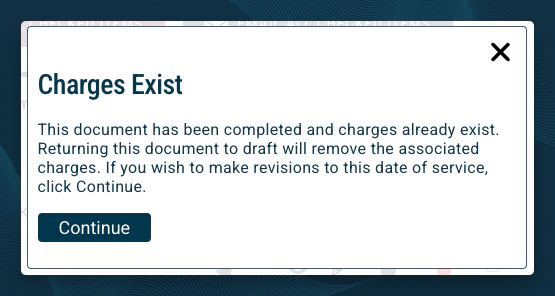
- A warning will pop up, informing you that the document has already been completed with charges. If you wish to proceed, click Continue.
- In the Amended Medical Record field at the top of the document, describe the correction you are making. Be specific — this note becomes part of the permanent record.
- Example: “Corrected units for 97110 from 4 to 3. Error identified on date of service.”
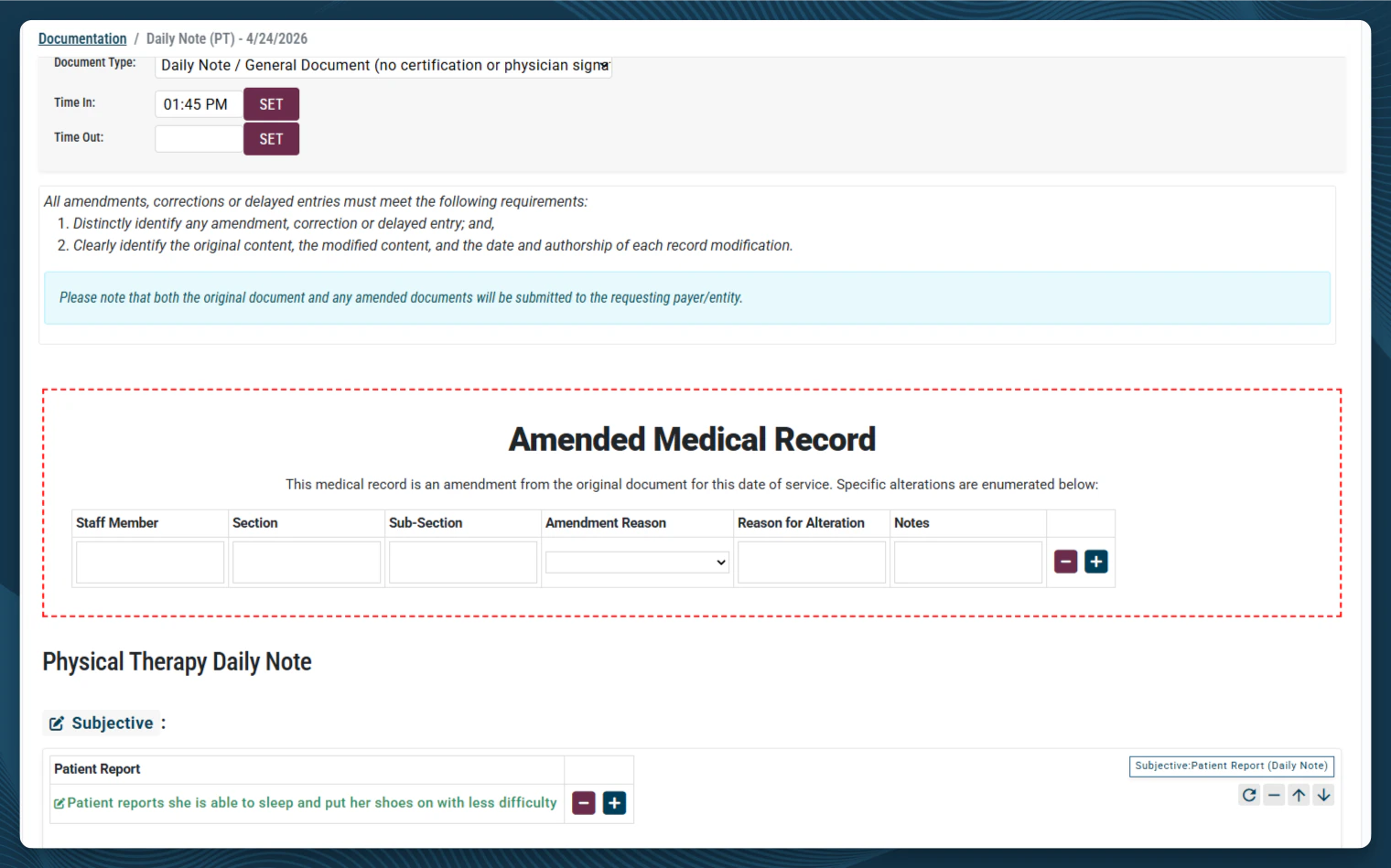
- Example: “Corrected units for 97110 from 4 to 3. Error identified on date of service.”
- Make the necessary changes within the body of the document.
- Save the document as Completed.

The V2 document is what StrataPT uses for billing going forward. The V1 is retained for audit purposes and to show the difference between the original and corrected documentation.
What Happens After You Submit the Amendment
StrataPT receives an automatic notification when a completed document is amended. The billing team reviews the change and contacts the insurance company to reprocess the claim with the corrected information. You do not need to contact StrataPT separately — the notification is sent automatically when you save the amended document as completed.Correcting a Wrong Date of Service
If the date of service on a billed note is incorrect, the amendment process alone cannot fix it. StrataEMR locks the date of service field once a claim has been submitted. Changing the date requires voiding the original note and creating a new one with the correct date. Here is the full process:- Clone the original note and correct the date. Click the Clone button for the document within the Clinical Documents list to create an exact copy of the original note. Then change the Date of Service at the top of the document to the correct date. Complete the note as usual.
- Amend the original note to void it. Open the document and click the pencil icon to begin an amendment. In the Amended Medical Record field, note that the date of service was entered incorrectly and select Void All Charges for the Amendment Reason. Complete and save the document as Completed (this creates V2 and notifies StrataPT).
- StrataPT voids the claim. Once notified, the billing team submits a void request to the payer for the incorrect date. You do not need to take any additional action for this step.
- StrataPT submits the corrected claim. The new cloned note generates a new claim with the correct date of service, which the billing team submits to the payer.
If the note has not yet been billed, you may be able to correct the date of service directly without voiding. Check the Pending Charges report first — if the note appears there, use Unlock Documentation & Edit Charges to make the correction before billing.