

Access: All licensed clinical staff can create and complete RTM documents unless otherwise configured by your practice administrators.
The Three Things to Know Before You Start
- RTM should be managed in its own case. RTM can technically be billed within the same case as other services, but mixing the two makes time tracking, monitoring day counts, and frequency rules much harder to manage. The strong recommendation is to create a dedicated RTM case.
- There are two billing clocks, not one. Device supply codes run on a rolling 30-day window starting the day monitoring begins. Treatment management codes run on the calendar month. These two clocks rarely align.
- Notes are completed at the end of the calendar month. Cumulative time and monitoring days are not final until the month closes, so finalizing earlier risks billing the wrong code.
Why a Separate RTM Case Is Strongly Recommended
You can bill RTM within an existing case, but operationally it gets messy fast. Here is what gets harder when RTM lives inside another case:- Time tracking blurs. RTM treatment management is driven by cumulative minutes across the calendar month. When those minutes live in the same case as in-clinic visit time, separating “what counts toward ” from “what was an in-clinic visit” becomes a manual reconstruction at month-end.
- The two billing clocks become harder to follow. A mixed case has to track an in-clinic plan of care, a rolling 30-day device supply window, and a calendar-month treatment management cycle on the same record.
- Frequency rules are harder to audit. Only one clinician can bill RTM for a patient in any 30-day period, and RTM cannot be billed in the same calendar month as RPM. These checks are easier to manage when RTM is structurally isolated.
- Audit defensibility weakens. When a payer requests records, a dedicated RTM case produces a clean evidence trail. A mixed case forces the reviewer (and your billing team) to disentangle which activity supports which charge.
How to Set Up an RTM Case
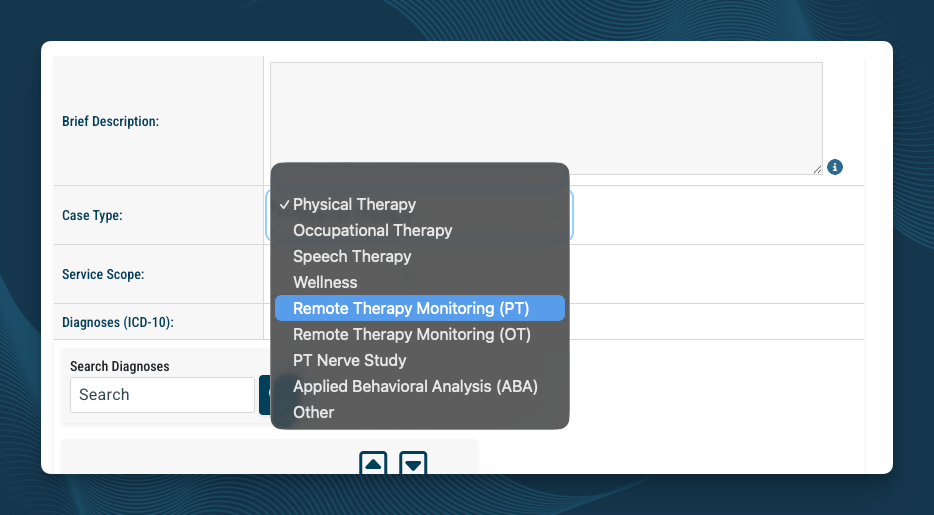
- Set the Case Type to one of the RTM options. This option appears in the Case Type dropdown on the Case Info page.
- Confirm the diagnosis codes reflect the musculoskeletal condition being monitored.
- Confirm the referring physician is set correctly.
- Use the Custom ID field on the Demographics page to label the case (for example, “RTM-PT”) so staff can distinguish it from the in-clinic case.
- Confirm a therapy plan of care is in place for the RTM case. All RTM codes are designated “sometimes therapy” services and require an active POC when furnished by a therapist.
The RTM Codes at a Glance
You will use three families of codes as a therapist billing RTM. Setup code (once per episode of care):
Device supply codes (one per 30-day window):
and are mutually exclusive. Bill one or the other for the same 30-day window, never both.
and are mutually exclusive. Pick the one that matches your actual cumulative time.
The Two Billing Clocks
This is the most common source of confusion in RTM billing. The codes do not all run on the same schedule. Device supply (, ):- Rolling 30-day window.
- The window starts the day monitoring begins for the patient.
- If monitoring starts on March 15, the first device supply window closes April 13, the next runs April 14 through May 13, and so on.
- Calendar month.
- Time resets on the first of each month, regardless of when the RTM episode started.
When to Complete the Notes
RTM notes are typically completed at the end of the calendar month. Cumulative time, monitoring days, and interactive communication evidence are not knowable until the month closes, so finalizing earlier risks under-coding or over-coding the charges. The exception is mid-month patient discharge from RTM, in which case complete the notes at that point with the totals captured through the discharge date.The Two RTM Note Templates
StrataEMR provides separate templates for the two distinct RTM billing events: the initial setup at the start of the episode, and the ongoing monthly treatment management. Both are available in the Physical Therapy Templates (RTM) document family on the Clinical Documents page.Template 1: RTM 30-Day Document
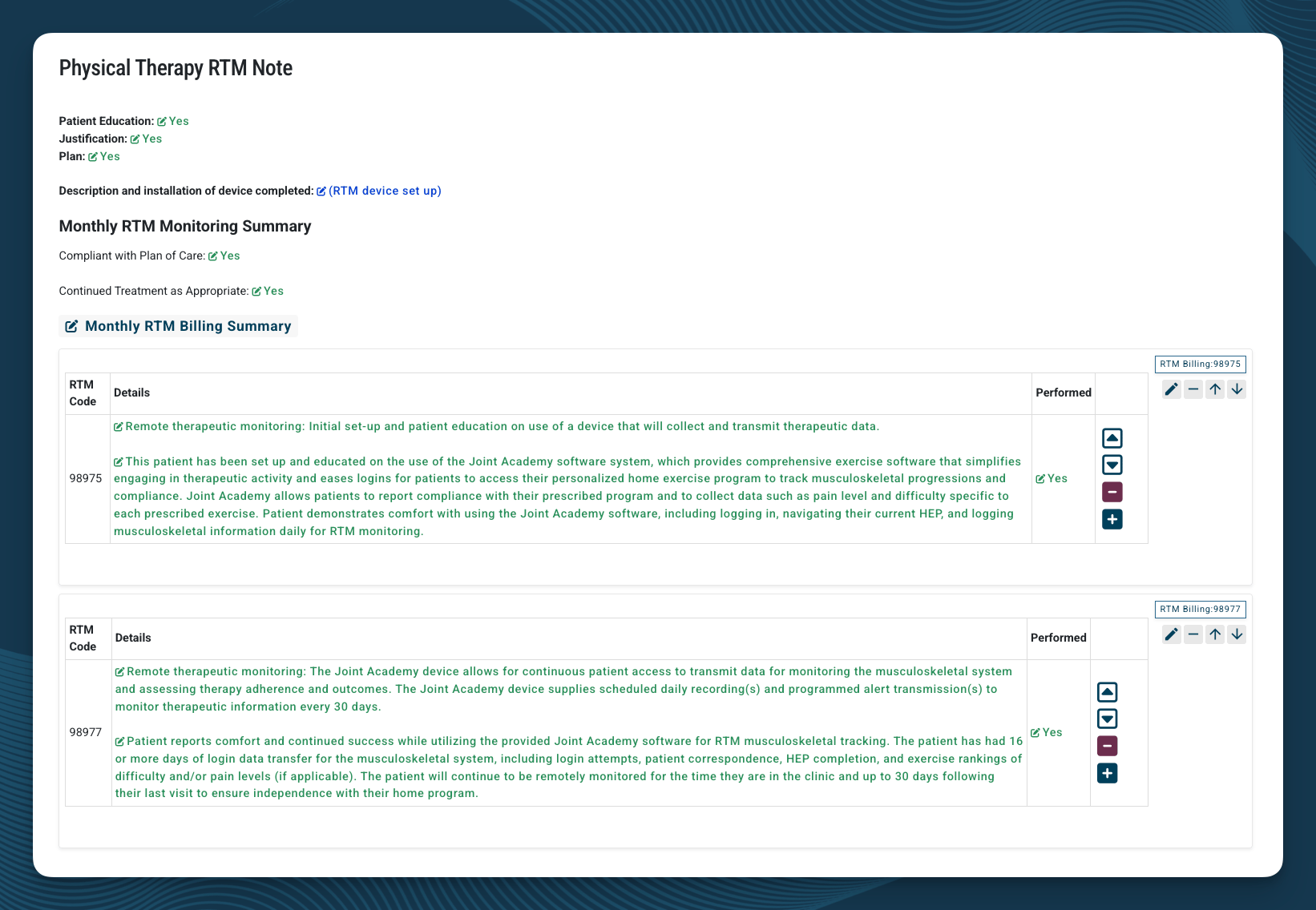
- (initial setup and patient education), billable only after at least 2 calendar days of cumulative monitoring data have been captured in the first 30-day window
- or , whichever matches the actual monitoring day total for the 30-day window
- Patient Education, Justification, and Plan confirmations
- Description and installation of the monitoring device
- Monthly RTM Monitoring Summary (Compliant with Plan of Care, Continued Treatment as Appropriate)
- Monthly RTM Billing Summary, with fragments for 98975, 98977, and 98985
Template 2: RTM Monthly Monitoring Document
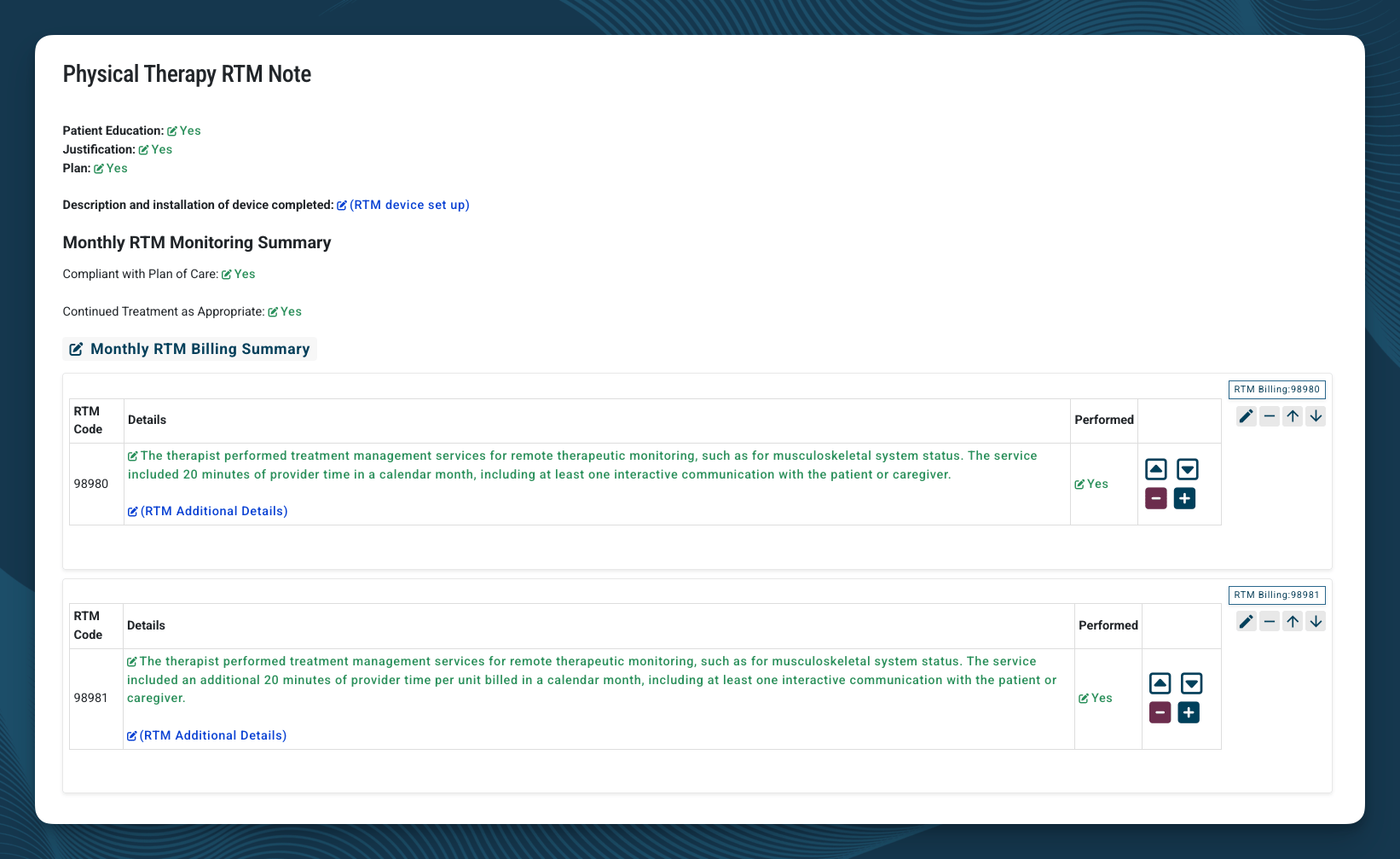
- (first 20 minutes of cumulative treatment management time in the calendar month, including at least one synchronous interactive communication with the patient or caregiver)
- (each additional 20 minutes of treatment management time in the same calendar month). 98981 is an add-on and can only be billed when 98980 is also billed. Each unit represents an additional 20 minutes beyond the first 20.
- Patient Education, Justification, and Plan confirmations
- Description and installation of device confirmation (carried forward from setup)
- Monthly RTM Monitoring Summary
- Monthly RTM Billing Summary with and
When Cumulative Time Is Less Than 20 Minutes
If cumulative time is less than 10 minutes for the calendar month, no treatment management code is billable for that month. If your cumulative treatment management time for a calendar month falls between 10 and 19 minutes for the calendar month, bill instead of . If time reaches 20 minutes or more for the calendar month, use the standard RTM Monthly Monitoring Document so that (and any applicable units) bill correctly.Rules Behind the Codes
These are the underlying CMS and CPT rules that drive the template structure. Understanding them helps you select codes correctly and document defensibly.Once per Episode of Care ()
can be billed only once per episode of care. An episode begins when RTM service starts and ends when targeted treatment goals are met. Re-billing for the same patient requires a new, documented episode with a new condition or goal. Sources:- AMA CPT 2026 Professional Edition
- APTA Practice Advisory: Remote Therapeutic Monitoring Codes Under Medicare (apta.org)
The 2-Day Setup Threshold ()
cannot be billed until the patient has accumulated at least 2 calendar days of valid monitoring data within the first 30-day window. The two days do not need to be consecutive. The setup work itself can happen on day one, but the claim cannot release until the threshold is met. Sources:- AMA CPT 2026 Professional Edition
- APTA Practice Advisory: Remote Therapeutic Monitoring Codes Under Medicare (apta.org)
Mutual Exclusivity
- and cannot both be billed for the same 30-day device supply window
- and cannot both be billed in the same calendar month
- can only be billed when is also billed in the same month, never with and never alone
- CMS MLN Matters MM14250: CY 2026 Annual Therapy Update (cms.gov)
- CMS CY 2026 Physician Fee Schedule Final Rule, Federal Register (federalregister.gov)
- AMA CPT 2026 Professional Edition
Synchronous Interactive Communication Required (, , )
Treatment management codes require at least one synchronous interactive communication with the patient or caregiver during the calendar month. CMS defines this as, at minimum, a real-time, two-way audio interaction that may be enhanced with video. In practice: in person, telephone, or video. Asynchronous communication does not satisfy this requirement. Text messages, app messages, email, automated reminders, secure messaging, and one-way notifications do not count, even if the patient responds later. Document the date, the modality (phone, video, in person), and what was discussed. Sources:- AMA CPT 2026 Professional Edition (descriptors for , , specify “real-time interactive communication”)
- APTA Practice Advisory: Remote Therapeutic Monitoring Codes Under Medicare (apta.org) - “must be synchronous if occurring in person or via telephone or video”
- CMS CY 2026 Physician Fee Schedule Final Rule, Federal Register (federalregister.gov)
- CMS CY 2021 Physician Fee Schedule Final Rule (original definition of “interactive communication”)
One Clinician per 30 Days
Only one clinician can bill RTM device supply and treatment management codes for a patient in any 30-day period. If the patient is receiving RTM through another provider, you cannot run a parallel RTM episode through your case during that window. Sources:- AMA CPT 2026 Professional Edition
- APTA Practice Advisory: Remote Therapeutic Monitoring Codes Under Medicare (apta.org)
Therapy Modifiers (GP, GO, GN)
All RTM codes are designated “sometimes therapy” services. When furnished by a therapist under a therapy plan of care, the appropriate discipline modifier must be applied:- GP for physical therapy
- GO for occupational therapy
- GN for speech-language pathology
These modifiers are automatically added to your claim when using StrataEMR based on the type of case selected.
- CMS MLN Matters MM14250: CY 2026 Annual Therapy Update (cms.gov)
- CMS Therapy Services webpage (cms.gov)
Assistant Modifiers (CQ/CO) Apply Selectively
The de minimis standard and CQ/CO modifiers apply only to , , , and when 10% or more of the service is delivered by a PTA or OTA. The de minimis standard and CQ/CO modifiers do not apply to the device supply codes and . This is a common error worth flagging in any billing review. Sources:- CMS CY 2026 Physician Fee Schedule Final Rule, Federal Register (federalregister.gov)
- Nixon Law Group: CMS Finalizes 2026 Remote Monitoring Reimbursement Updates (nixonlawgroup.com)
Therapists Cannot Bill RTM “Incident To”
When you bill RTM as a PT or OT, the service must be personally furnished by you or by a therapy assistant under your supervision. RTM cannot be delegated to non-clinical staff or unlicensed personnel under a therapist’s billing. This is different from the rule for physicians, who can bill some RTM services incident to under general supervision. Sources:- CMS CY 2023 Physician Fee Schedule Final Rule
- APTA Practice Advisory: Remote Therapeutic Monitoring Codes Under Medicare (apta.org)
- Frost Brown Todd: CMS Final Rules on Payment Impacts for Remote Therapeutic Monitoring (frostbrowntodd.com)
“Sometimes Therapy” Designation Expanded for 2026
In the CY 2026 Physician Fee Schedule Final Rule, CMS designated the three new RTM codes (, , ) as “sometimes therapy” services and revised the descriptors of and to specify the 16-30 day window. When furnished by a therapist, all of these codes must be billed under a therapy plan of care with the appropriate discipline modifier.- 98979: Remote therapeutic monitoring treatment management services, physician or other qualified health care professional time in a calendar month requiring at least 1 real-time interactive communication with the patient or caregiver during the calendar month; first 10 minutes.
- 98985: Remote therapeutic monitoring (eg, therapy adherence, therapy response, digital therapeutic intervention); device(s) supply for data access or data transmissions to support monitoring of musculoskeletal system, 2-15 days in a 30-day period.
- 98977: Remote therapeutic monitoring (eg, therapy adherence, therapy response, digital therapeutic intervention); device(s) supply for data access or data transmissions to support monitoring of musculoskeletal system, 16-30 days in a 30-day period.
- 98984: Remote therapeutic monitoring (eg, therapy adherence, therapy response, digital therapeutic intervention); device(s) supply for data access or data transmissions to support monitoring of respiratory system, 2-15 days in a 30-day period.
- 98976: Remote therapeutic monitoring (eg, therapy adherence, therapy response, digital therapeutic intervention); device(s) supply for data access or data transmissions to support monitoring of respiratory system, 16-30 days in a 30-day period.
- CMS Pub 100-04 Medicare Claims Processing: 2026 Annual Update to the Therapy Code List (cms.gov)
- CMS MLN Matters MM14250: CY 2026 Annual Therapy Update (cms.gov)
- CMS CY 2026 Physician Fee Schedule Final Rule, Federal Register (federalregister.gov)
Adjusting the Templates
Each RTM template includes the full set of fragments available for that note type. Remove the fragments that do not apply to the work performed. For example, on the RTM 30-Day Document, remove either the fragment or the fragment depending on the actual monitoring day total, leaving the fragment that matches the period being billed.Common Mistakes to Avoid
- Mixing RTM into a regular PT, OT, or Speech case without a plan to track it separately. RTM can technically be billed inside another case, but the time and frequency tracking gets hard fast. Use a separate RTM case unless you have a specific reason not to.
- Completing the setup note before 2 monitoring days have been captured. cannot be billed until the threshold is met. Hold the setup note in Draft until the threshold is confirmed.
- Billing both and for the same 30-day window. They are mutually exclusive. Remove the fragment that does not apply.
- Billing both and in the same calendar month. They are mutually exclusive. Use the template that matches the cumulative time total.
- Billing without , or stacking on . is an add-on that requires in the same month.
- Counting asynchronous communication toward the interactive communication requirement. Text, email, and app messages do not qualify. Synchronous (phone, video, in person) only.
- Applying CQ/CO modifiers to or . The assistant modifiers do not apply to device supply codes.
- Completing the monthly note before the calendar month closes. Cumulative time is not final until end of month. Completing early risks billing the wrong codes.