

Access: Available to all clinicians creating clinical documentation. There is no separate permission required to use Get From Previous Docs.
How Get From Previous Docs Works
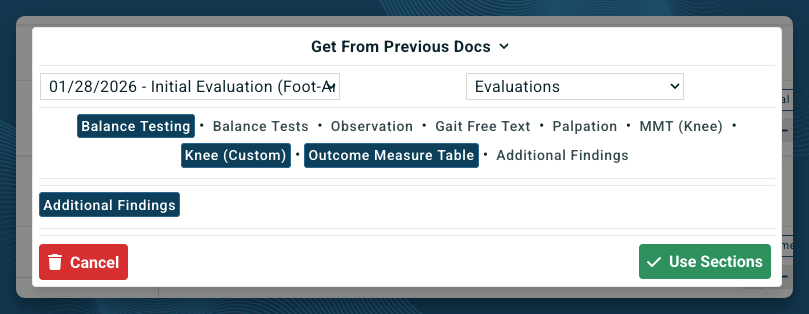
- Left drop down - select the clinical document you want to pull from.
- Right drop down - select the specific section(s) within that document you want to bring forward.
Get From Previous Docs vs. Starting-Document Inheritance Options
When you start a new document, you choose one of three options, Inherit Previous, Inherit Patient Intake, or Start From Blank, and that choice applies automatically to the whole document, pulling from the patient’s most recently completed document. See Starting Documentation for details on those options. Get From Previous Docs is different: it’s used from inside a document you’ve already started, applies one section at a time, and lets you choose any prior document as the source, not just the most recent one. A common pattern is to start a document from a blank template, then use Get From Previous Docs on individual headings to pull in only the specific content you need.Using Get From Previous Docs During a Re-Evaluation
Get From Previous Docs is especially useful for Re-Evaluations, where you want to compare a patient’s current status against specific prior scores rather than pull an entire document forward. For example, starting a Physical Therapy Re-Evaluation from a blank template:- Click the Evaluations heading.
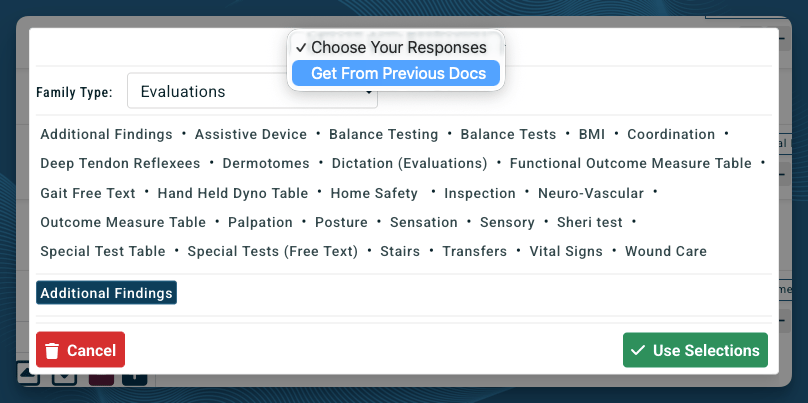
- Change Choose Your Responses to Get From Previous Docs.
- On the left, select the prior document, for example, the patient’s Initial Evaluation.
- On the right, select the specific sections you want, for example, balance, knee, and outcome measure scores.
- Click Use Sections.